Auditing three clouds without writing three scripts
If you've audited buckets in more than one cloud, you already know what this is like. Three consoles. Three CLIs. Three auth patterns. And a bit of glue code to pull the outputs together every time someone asks a question that spans all three.
The question is usually simple. "Which buckets are public across all our clouds?" You end up running three separate scripts, then reconciling three different output shapes just to give one answer.
This tutorial doesn't make that faster. It replaces it. One query, one view, all three clouds.
What StackQL is, in three sentences
StackQL is SQL for cloud APIs. You write a normal SQL query, and it makes the API calls to AWS, GCP, Azure, or dozens of other providers to get the answer back as rows and columns.
The important part for this tutorial: it queries the live provider APIs on every run. There's no local database, no cache, no sync job to schedule. What you see is the current state of your cloud, right now.
It exists because someone got tired of writing the same audit logic three times.
What you'll need
You'll need Docker installed and read-only credentials for whichever clouds you want to audit. All three are optional. If you leave a cloud's credentials blank, it gets skipped.
For AWS, GCP, and Azure, the audit needs a service account or role that can list storage buckets and read their configuration. The audit-action repo has the exact permissions per provider here.
Run the audit
The tutorial folder has three files: a docker-compose file, an .env.audit.example template, and a README. Grab the folder from docs/tutorials/preview-bucket-01/ in the stackql/stackql repo.
1. Copy the env template
cp ./audit/.env.audit.example ./audit/.env.audit
Then open .env.audit and fill in credentials for whichever clouds you want. The variables are named for what they are: AWS_ACCESS_KEY_ID, AWS_SECRET_ACCESS_KEY, AWS_REGION, AZURE_TENANT_ID, AZURE_CLIENT_ID, AZURE_CLIENT_SECRET, GOOGLE_CREDENTIALS (the service account JSON, on one line), and GOOGLE_ORG_ID.
If you're only auditing one or two clouds, leave the others blank.
2. Pull the StackQL Docker image
docker compose -f docker-compose.bucket.audit.yaml pull
The tutorial pins to stackql/stackql:v0.10.601. The audit uses views under stackql_preview.* which are still evolving, so pinning matters for reproducibility.
3. Run the audit
docker compose -f docker-compose.bucket.audit.yaml run --rm stackql
On a modest account this takes about 30 seconds. Output goes straight to your terminal as a table.
What the output tells you
When the audit finishes, you get a single table printed to your terminal. Something like this (bucket names are placeholders):
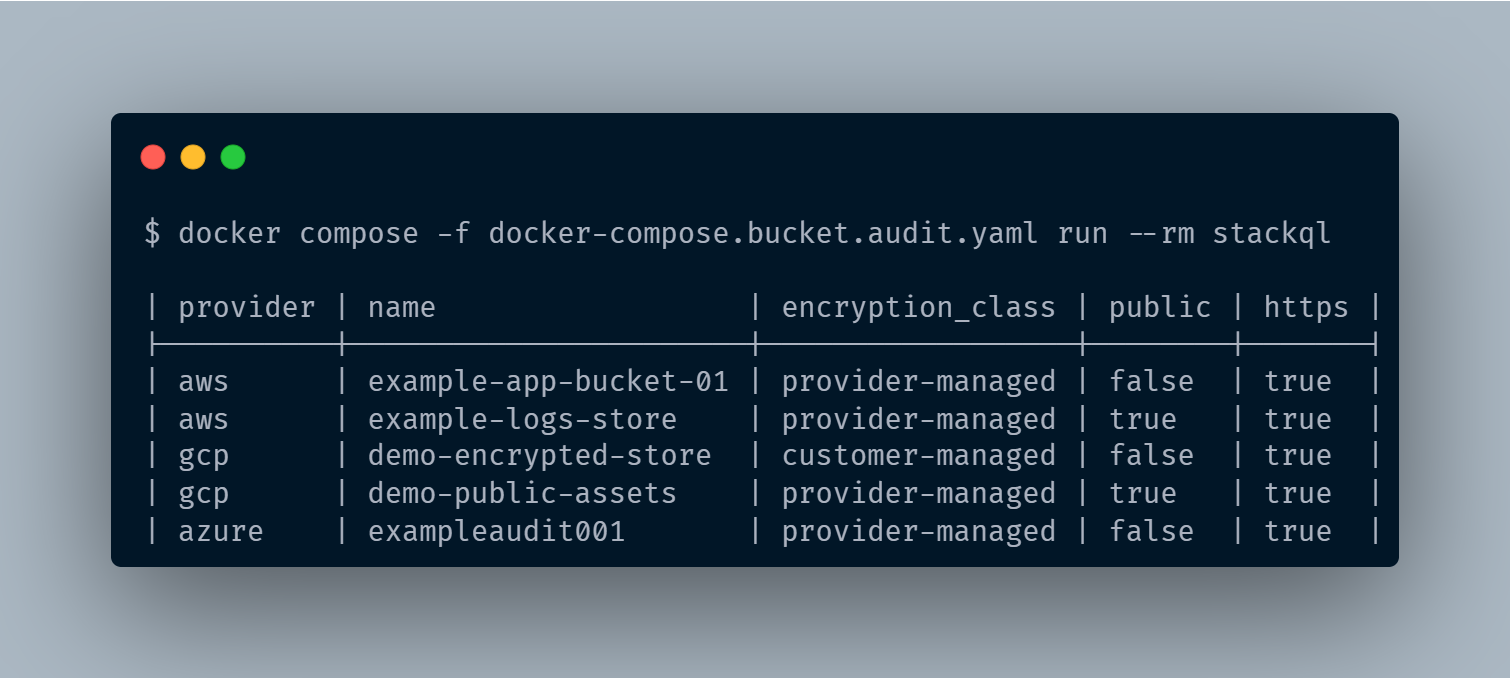
Example output from the audit. Bucket configuration across three cloud providers in one normalised table.
The point isn't the specific findings. It's the shape.
Three different resource types (S3 buckets, GCS buckets, and Azure Storage Accounts) normalised into one table with the same columns. Encryption class, public flag, HTTPS enforcement. Side by side, for every cloud you provided credentials for.
A few patterns to notice in the table:
- Public buckets across providers. Filter by
public = trueand you have the answer to your security team's question, in every cloud, in one place. - Encryption side by side. The
encryption_classcolumn shows which buckets use provider-managed keys versus customer-managed. Different providers have different naming conventions internally; StackQL normalises them to the same two categories. - HTTPS enforcement in one column. Whether it's S3 bucket policies, GCS uniform access, or Azure secure transfer, same column, same values, no translation needed.
This is what SQL for cloud APIs actually delivers. Not just SQL as a query language, but a uniform data model across providers, so you can ask one question and get one answer.
Performance and scope
StackQL runs each provider's query in parallel using the credentials you provided. There's no local database being populated and no background sync; every run hits the live APIs and returns what's there right now.
On the test account this took about 30 seconds. The query is scoped to one AWS region and one GCP organization, which keeps the API footprint bounded and reflects the current preview default. Streaming output and broader audits (across regions, deeper across resource types) are in flight from the StackQL team.
What this covers today
Today, this audit covers storage buckets across AWS, GCP, and Azure. One region at a time for AWS, one organization at a time for GCP. Entitlements, IAM, and other resource types are on the roadmap as separate audits under stackql_preview.* and will get their own tutorials as they land.
Where to go next
github.com/stackql/stackql is the flagship repo. If this tutorial was worth reading, give it a star. It's genuinely the thing that tells the team to build more tutorials like this one, and it helps other engineers with the same three-console problem find the project.
A few natural next steps from here:
- Run it against your own accounts. The audit works exactly the same way against real credentials. You can start with one cloud and add the others by adding their env vars.
- Move it into CI. The
stackql-audit-actionrepo has ready-to-use GitHub Actions workflows for all-clouds, single-cloud, deep-audit, and OIDC-authenticated variants. Drop one into your repo, add secrets, and you have a scheduled cross-cloud audit running on every push. - Ask questions. The StackQL community Slack is the fastest way. GitHub issues on the flagship repo also work.
More audits are on the way, including entitlements, deeper checks, and larger estates. If there's a specific one you'd find useful, opening an issue is the fastest way to get it on the roadmap.