One manifest, two clouds: multi-cloud infrastructure with stackql-deploy
Tutorial 3 introduced stackql-deploy against a single Google Cloud project. One manifest, one provider, one VPC. The framework proved its shape: declarative resources described as SQL-anchored files, an exists-create-statecheck-exports loop that runs idempotently against live cloud APIs, no state file to maintain.
This tutorial takes the same framework and puts it to work across two clouds at once. One manifest declares both a GCP VPC and an AWS VPC. One build command provisions both in the same run. The manifest becomes a single source of truth for infrastructure that spans providers, without introducing a second tool or a second DSL.
Along the way, the AWS side of the walkthrough shows features that the minimal Google example does not need: per-environment values, tag-based resource identification, resource composability through exports, and provider-specific query helpers. The interesting part is not just deploying to two clouds, but managing both through the same manifest and lifecycle.
What multi-cloud in one manifest looks like
A multi-cloud stackql-deploy project is structurally the same as a single-cloud one, with two additions: multiple providers in the providers block, and one .iql file per resource under either cloud. Scaffold two starter projects first, then combine:
stackql-deploy init multi-cloud-stack --provider google
stackql-deploy init aws-stack --provider aws
Merge the resulting manifests and copy both resource files into a single project. The combined manifest structure:
version: 1
name: "multi-cloud-stack"
description: "GCP VPC + AWS VPC in one deployment"
providers:
  - google
  - awscc
globals:
  - name: project
    value: "{{ MY_PROJECT_NAME }}"
  - name: region_aws
    value: "{{ AWS_REGION }}"
  - name: global_tags
    value:
      - Key: 'stackql:stack-name'
        Value: "{{ stack_name }}"
      - Key: 'stackql:stack-env'
        Value: "{{ stack_env }}"
resources:
  - name: gcp_vpc
    props:
      - name: vpc_name
        value: "{{ stack_name }}-{{ stack_env }}-gcp-vpc"
    exports:
      - vpc_name
      - vpc_link
  - name: aws_vpc
    props:
      - name: vpc_cidr_block
        values:
          prd: {value: "10.0.0.0/16"}
          sit: {value: "10.1.0.0/16"}
          dev: {value: "10.2.0.0/16"}
      - name: vpc_tags
        value:
          - Key: Name
            Value: "{{ stack_name }}-{{ stack_env }}-aws-vpc"
        merge: ['global_tags']
    exports:
      - vpc_id
      - vpc_cidr_block
There are two details to notice in the manifest. First, the provider list carries two entries, and the framework loads both before processing the resources. Second, the AWS resource declares per-environment CIDRs through a values block, while the GCP resource uses a simpler single-value pattern. Using an AWS-specific variable name (region_aws) also avoids collisions when provider-specific settings share generic names such as region.
The GCP side
The GCP resource file (resources/gcp_vpc.iql) follows the same shape covered in Tutorial 3. The exists check queries google.compute.networks by name. The create anchor INSERTs into the same view. For this provider method, the request-body fields use the data__ prefix while project stays plain because it maps to the URL path. Statecheck verifies autoCreateSubnetworks, and delete removes the network.
For readers who want the full anchor breakdown, Tutorial 3 walks through each block. Here the point is that adding a GCP resource to a multi-cloud stack takes exactly one .iql file. No coordination code, no shared state, no cross-provider glue.
The AWS side
The AWS resource file (resources/aws_vpc.iql) uses the awscc provider, which wraps AWS Cloud Control API. The anchor structure is the same as GCP, but the queries have real differences worth walking through.
The exists check for AWS uses tags as the resource identifier, not names:
/*+ exists */
WITH tagged_resources AS
(
  SELECT split_part(ResourceARN, '/', 2) as vpc_id
  FROM awscc.tagging.tagged_resources
  WHERE region = '{{ region_aws }}'
  AND TagFilters = '{{ global_tags | to_aws_tag_filters }}'
  AND ResourceTypeFilters = '["ec2:vpc"]'
),
vpcs AS
(
  SELECT vpc_id
  FROM awscc.ec2.vpcs_list_only
  WHERE region = '{{ region_aws }}'
)
SELECT r.vpc_id
FROM vpcs r
INNER JOIN tagged_resources tr
ON r.vpc_id = tr.vpc_id;
This is a JOIN between two AWS API surfaces. The tagged_resources view returns anything with matching stackql tags. The vpcs_list_only view returns VPCs in the region. The inner join returns only VPCs that match both, which is how the framework asks "has our stack already put a VPC here?" without needing to remember an ID from a previous run. The stack tags identify the VPC, so the framework does not need to persist the VPC ID from a previous run.
The to_aws_tag_filters filter is a stackql helper that turns the manifest's tag list into the JSON shape the AWS tagging API expects. Provider-specific helpers like this keep the manifest declarative without leaking wire-format details into the resource files.
The create INSERT uses direct column names (no data__ prefix) for this awscc method:
/*+ create */
INSERT INTO awscc.ec2.vpcs (
  CidrBlock,
  Tags,
  EnableDnsSupport,
  EnableDnsHostnames,
  region
)
SELECT
  '{{ vpc_cidr_block }}',
  '{{ vpc_tags }}',
  true,
  true,
  '{{ region_aws }}'
RETURNING *;
The AWS resource also demonstrates two useful features. The vpc_cidr_block value comes from the per-environment values block in the manifest, so this same create runs different CIDRs in dev, sit, and prd. The RETURNING * clause captures the created resource's fields into the framework's context, which is how downstream anchors can reference {{ this.vpc_id }} without another query.
Statecheck uses a custom awscc function to compare tag policies:
/*+ statecheck, retries=5, retry_delay=5 */
SELECT COUNT(*) as count FROM
(
  SELECT AWS_POLICY_EQUAL(tags, '{{ vpc_tags }}') as test_tags
  FROM awscc.ec2.vpcs
  WHERE Identifier = '{{ this.vpc_id }}'
  AND region = '{{ region_aws }}'
  AND cidr_block = '{{ vpc_cidr_block }}'
) t
WHERE test_tags = 1;
AWS_POLICY_EQUAL is a provider-specific helper used here to compare the returned tags with the desired tag policy. It keeps the statecheck compact instead of expanding the tag comparison into a much larger SQL expression.
Preview with a dry run
With both AWS and GCP credentials available in your environment, render the full multi-cloud plan first. The dry run resolves variables and prints the provider-specific SQL without creating resources.
stackql-deploy build multi-cloud-stack dev --dry-run \
  -e MY_PROJECT_NAME=your-gcp-project \
  -e AWS_REGION=ap-south-1
In the validated run, stackql-deploy loaded both google and awscc, rendered the GCP VPC queries with the method-specific data__ fields, rendered the AWS tag-based lookup and VPC INSERT for ap-south-1, and finished with dry-run build complete.
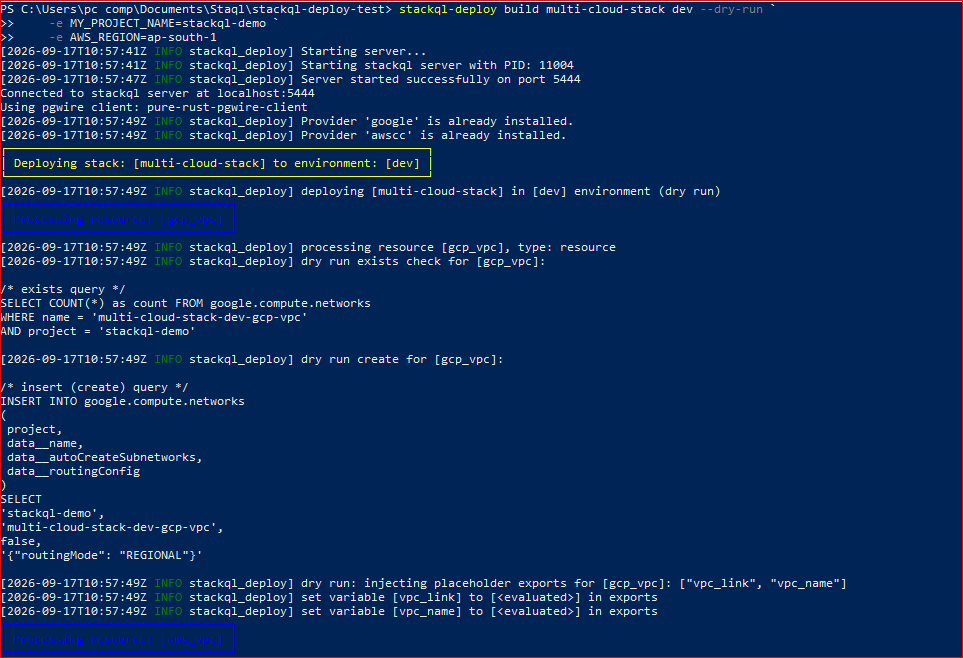
Dry run, part 1: both providers load and the GCP resource renders without creating anything.
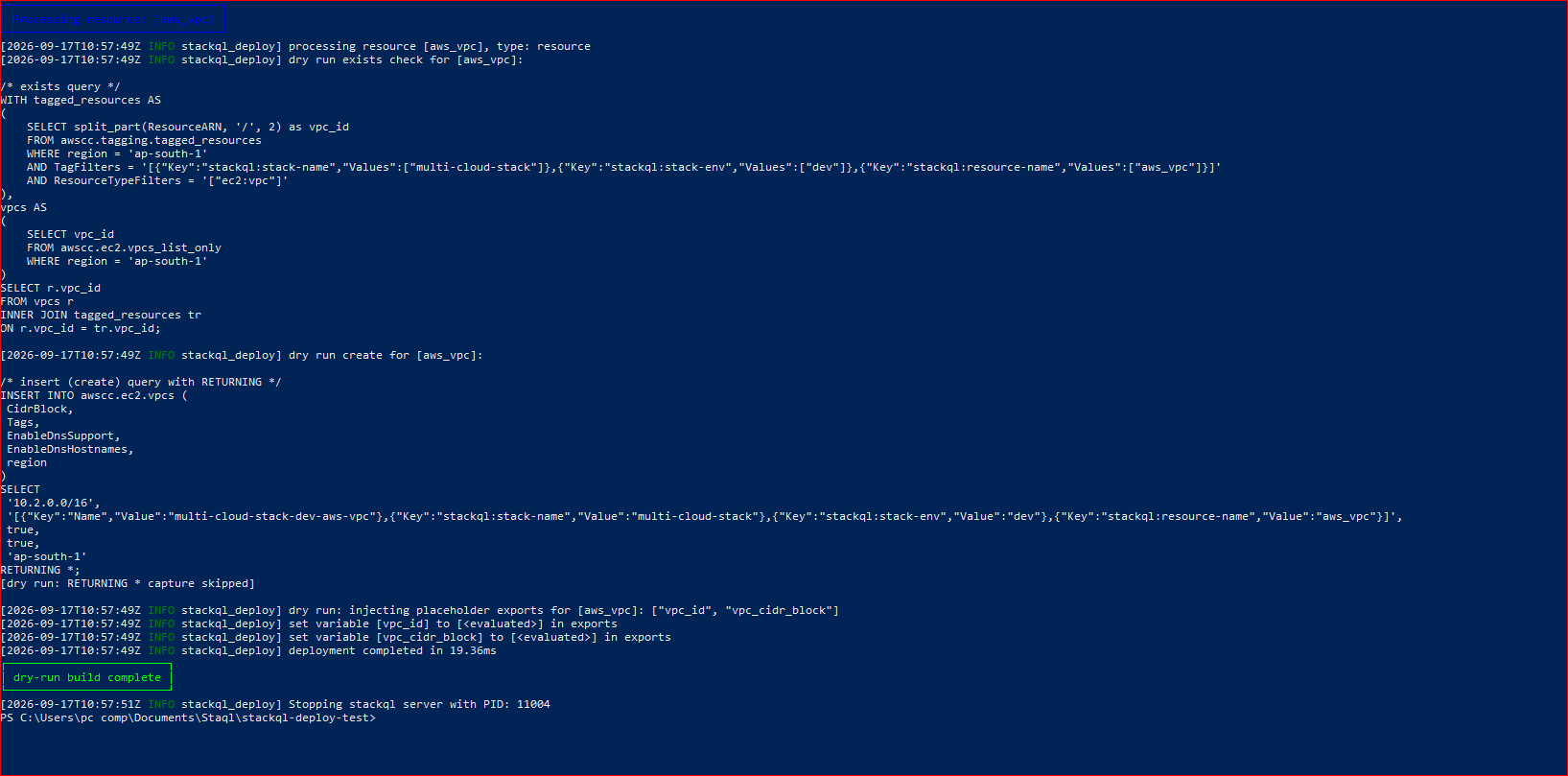
Dry run, part 2: AWS queries render with ap-south-1, then the run ends with dry-run build complete.
Run the real multi-cloud build
After the dry run looks right, run the same stack without --dry-run:
stackql-deploy build multi-cloud-stack dev \
  -e MY_PROJECT_NAME=your-gcp-project \
  -e AWS_REGION=ap-south-1
The first validated build created both VPCs in one deployment. GCP completed the exists → create → statecheck → exports sequence, followed by AWS. The AWS exists query retried while Cloud Control finished provisioning, then captured the VPC ID. The full multi-cloud build completed successfully in 13.39 seconds in the captured run.
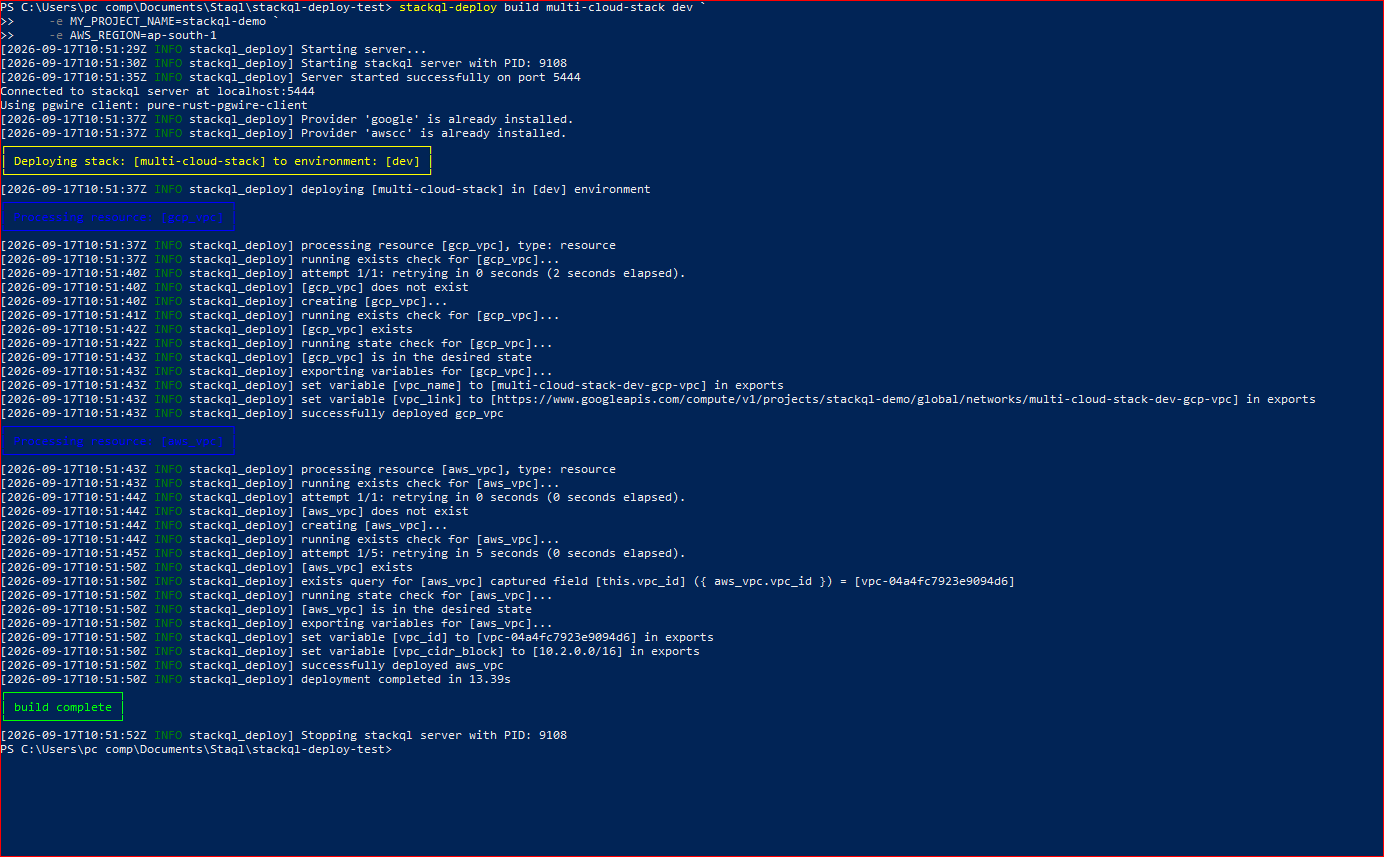
First real build: both gcp_vpc and aws_vpc are created, verified, exported, and the build completes.
Run it again: verify idempotence
Run the same build command again without changing the manifest. On the second validated run, both VPCs already existed, both statechecks passed, and there was no create step for either resource. The same AWS VPC ID was reused and the build completed in 4.69 seconds.
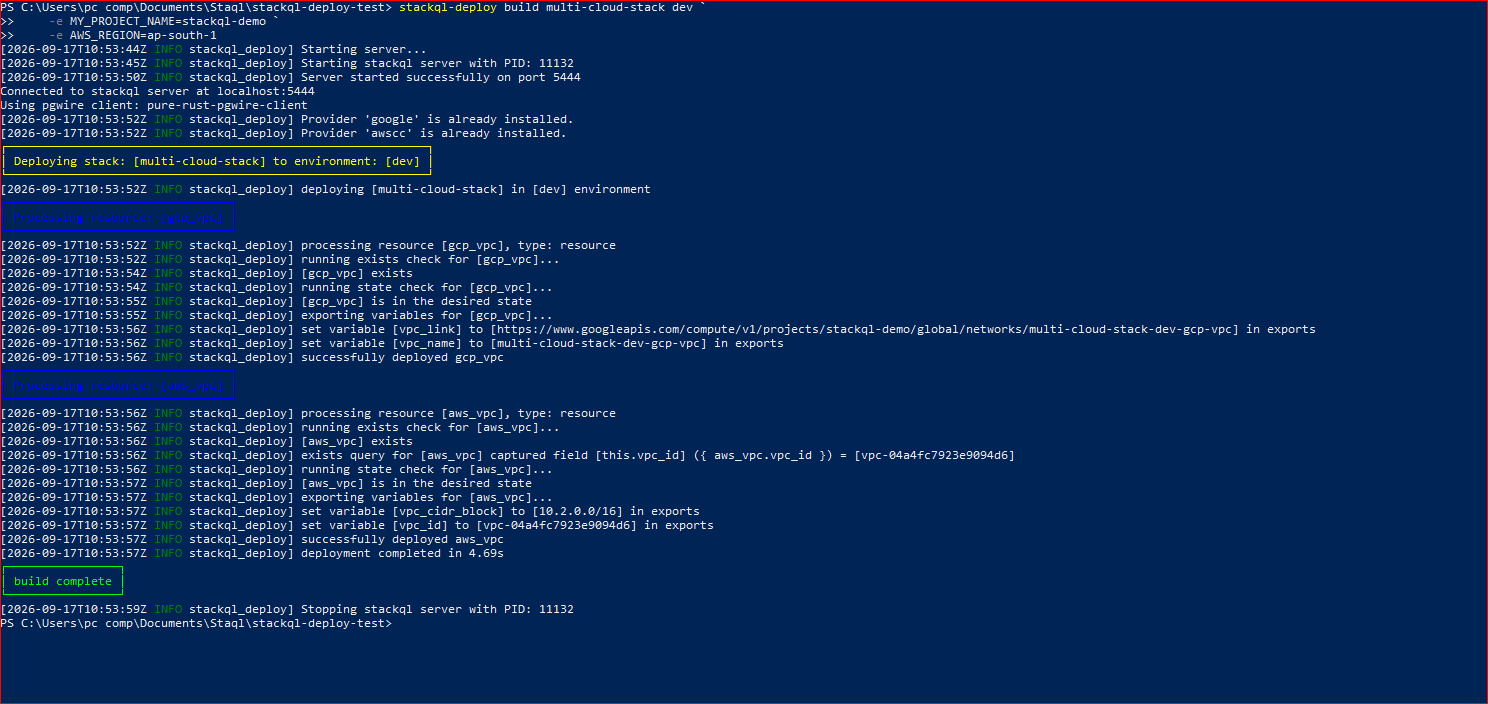
Second build: both resources already exist, statechecks pass, and nothing is recreated.
Tear down both clouds
The same project can clean up both resources with one teardown command:
stackql-deploy teardown multi-cloud-stack dev \
  -e MY_PROJECT_NAME=your-gcp-project \
  -e AWS_REGION=ap-south-1
The validated teardown collected the resource exports, deleted the AWS VPC first, then deleted the GCP VPC, and used post-delete checks to confirm that both resources were gone. The run finished with teardown complete.
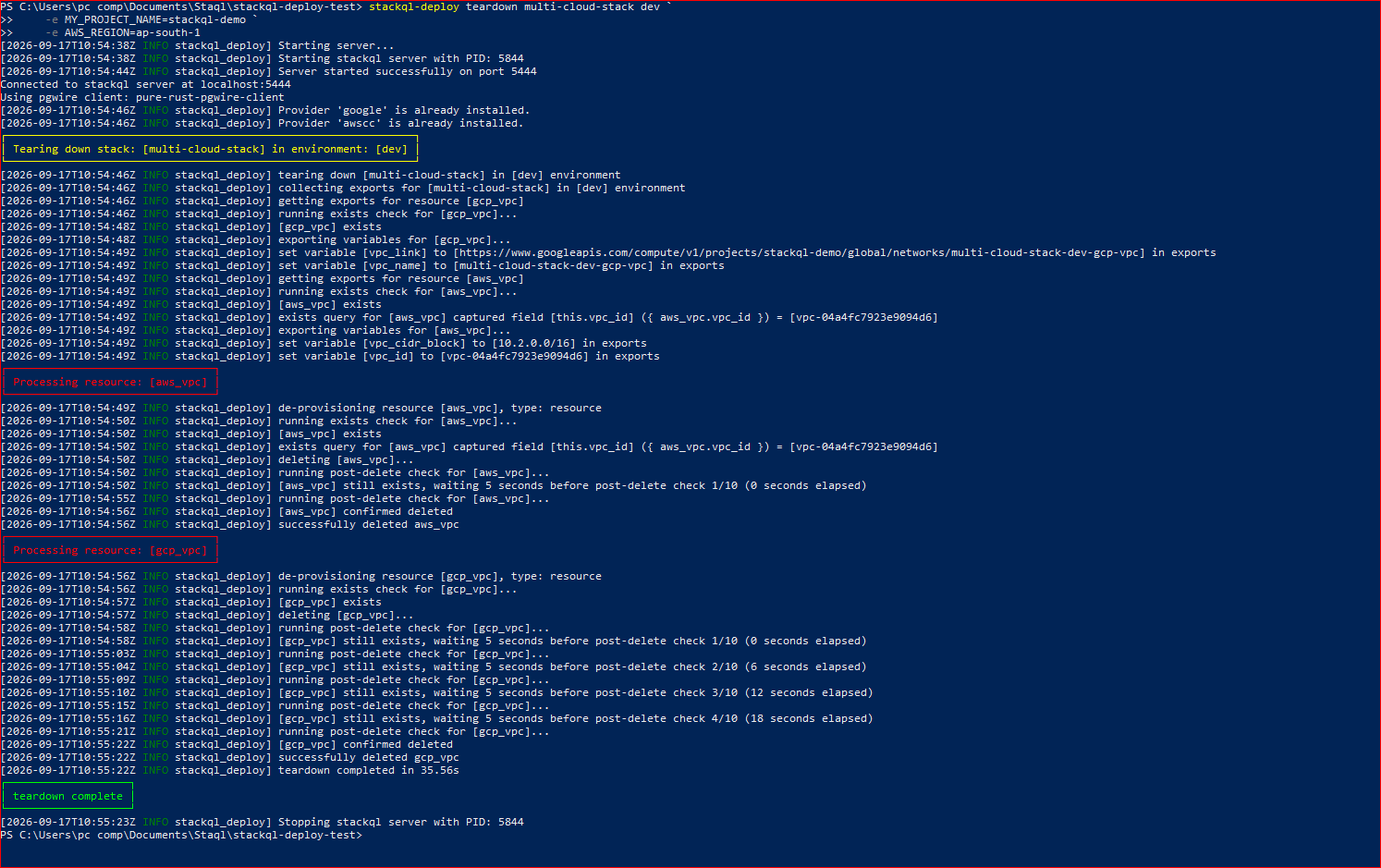
Teardown: both cloud resources are deleted and confirmed absent.
When Cloud Control operations run async
AWS Cloud Control operations can complete asynchronously. In this example, the create request returns before the VPC is immediately discoverable through the tag-based exists query, so the resource definition retries the check while the API finishes provisioning.
The stackql-deploy framework handles that timing through retry settings on the exists and state checks. In this AWS resource, retries=5 with retry_delay=5 causes repeated checks at five-second intervals. Slower resources may need larger retry windows based on their normal provisioning time.
If the exists check exhausts its retries after a create, the framework reports the resource as failed. When that happens, the create might still be running in the background. To check the actual status of a stuck Cloud Control operation, query it directly through AWS CLI:
aws cloudcontrol list-resource-requests \
  --region ap-south-1 \
  --resource-request-status-filter "OperationStatuses=FAILED,Operations=CREATE" \
  --output table
The output shows recent failed CREATE requests with their StatusMessage and ErrorCode. That is useful when the build does not complete because the underlying Cloud Control operation was rejected or is still progressing. Common causes include quota limits, IAM permission gaps, and parameter validation errors.
What this enables
This run demonstrates that AWS and GCP resources can use the same deployment lifecycle while keeping their provider-specific SQL separate.
Environment values, tags, exports, state checks, and teardown remain in one project, while each .iql file reflects the API semantics of its provider. The second build demonstrated the idempotent path: both VPCs already existed, their statechecks passed, and neither resource was recreated.
Instead of maintaining separate provisioning scripts for each cloud, the project keeps the resource definitions, environment-specific values, tags, and exports in one manifest-driven workflow.
The same pattern can be extended to additional stackql providers, subject to the capabilities and method contracts of each provider. Provider-specific SQL stays in each resource file while the lifecycle remains consistent.
Where this fits in the series
Tutorial 1 introduced stackql for querying live cloud state across multiple clouds with SQL. Tutorial 2 showed how the same query engine lets agents read live state before mutating anything, one query at a time. The Actions guide put the audit pattern in CI. Tutorial 3 introduced stackql-deploy as the framework that operationalizes the query-before-mutation pattern for a full cloud stack. This tutorial takes that framework across two clouds at once, showing what a real multi-cloud manifest looks like and how the framework handles the different provider semantics under the same lifecycle.
If the pattern makes sense to you, star the stackql repository so more developers find it. Full documentation, more manifest examples, and provider-specific guides are at stackql-deploy.io.
This closes the series for now. Cloud infrastructure exposes structured APIs that can be queried and changed declaratively. Across the four tutorials, the same query layer was used to audit live cloud state, gate mutations with SQL checks, run continuous audit checks in CI, and declare a tested AWS + GCP stack through manifest-plus-anchored queries.