Declarative cloud stacks in SQL: an intro to stackql-deploy
Tutorial 2 in this series showed the query-before-mutation pattern by hand. Query live state, apply a policy gate, mutate what's out of policy, verify convergence. Every step was a SQL statement typed into a shell. The pattern held, but the shape was low-level. One resource at a time. One session at a time. No structure for repeating it across environments or holding it right over time.
stackql-deploy takes that pattern and turns it into a framework. Define your resources once as SQL-anchored files, declare them in a manifest, and let the framework run the exists check, the create-or-update, the state check, and the exports as a single build. Same underlying pattern, now something a team can operate at scale.
This tutorial walks through the tool end to end. What it is, how a project is shaped, how a single resource is defined, and how the whole thing runs against a real Google Cloud project.
What stackql-deploy is
stackql-deploy is a model-driven deployment framework built on top of stackql. You describe cloud resources as SQL query files (each with a few named blocks called anchors), collect them in a manifest, and run a single command to converge your cloud state to what the manifest declares. It's inspired by dbt in shape: a project directory, models as files, environments as configurations, and a small CLI that operates on the whole thing.
Three properties are worth naming up front.
Declarative. You describe what you want to exist. The tool figures out whether to create, update, or leave alone based on live queries against the cloud API, not a cached state file.
Idempotent by design. Every resource has an exists check and an optional state check. The tool skips resources that already match, updates what has drifted, and creates what is missing. Running build twice in a row produces the same converged state, but only the first run actually mutates anything.
Provider-agnostic through the stackql query layer. Because everything under the hood is stackql SQL against real cloud APIs, the same tool can deploy AWS, GCP, Azure, Snowflake, Databricks, or any other provider stackql supports. One framework, one query grammar, many clouds.
How a project is shaped
A stackql-deploy project is a directory with a manifest at the root and one .iql file per resource. Scaffolding a new project uses the init command:
stackql-deploy init example-stack --provider google
This creates a directory shaped like this:
example-stack/
├── stackql_manifest.yml
└── resources/
    └── example_vpc.iql
The manifest declares the providers, the global variables, and the resources the stack contains. Here is a minimal one for a single VPC network in GCP:
version: 1
name: "example-stack"
description: description for "example-stack"
providers:
  - google
globals:
  - name: project
    value: "{{ MY_PROJECT_NAME }}"
  - name: region
    value: australia-southeast1
resources:
  - name: example_vpc
    props:
      - name: vpc_name
        value: "{{ stack_name }}-{{ stack_env }}-vpc"
    exports:
      - vpc_name
      - vpc_link
The globals block holds values that apply across every resource. The template syntax reads environment variables or values passed at build time. The resources block lists each thing to deploy, with per-resource properties that get substituted into the SQL below.
How a resource is defined
Each .iql file holds one resource. Inside the file, named blocks (anchors) declare the different query shapes the framework runs at different points in the lifecycle:
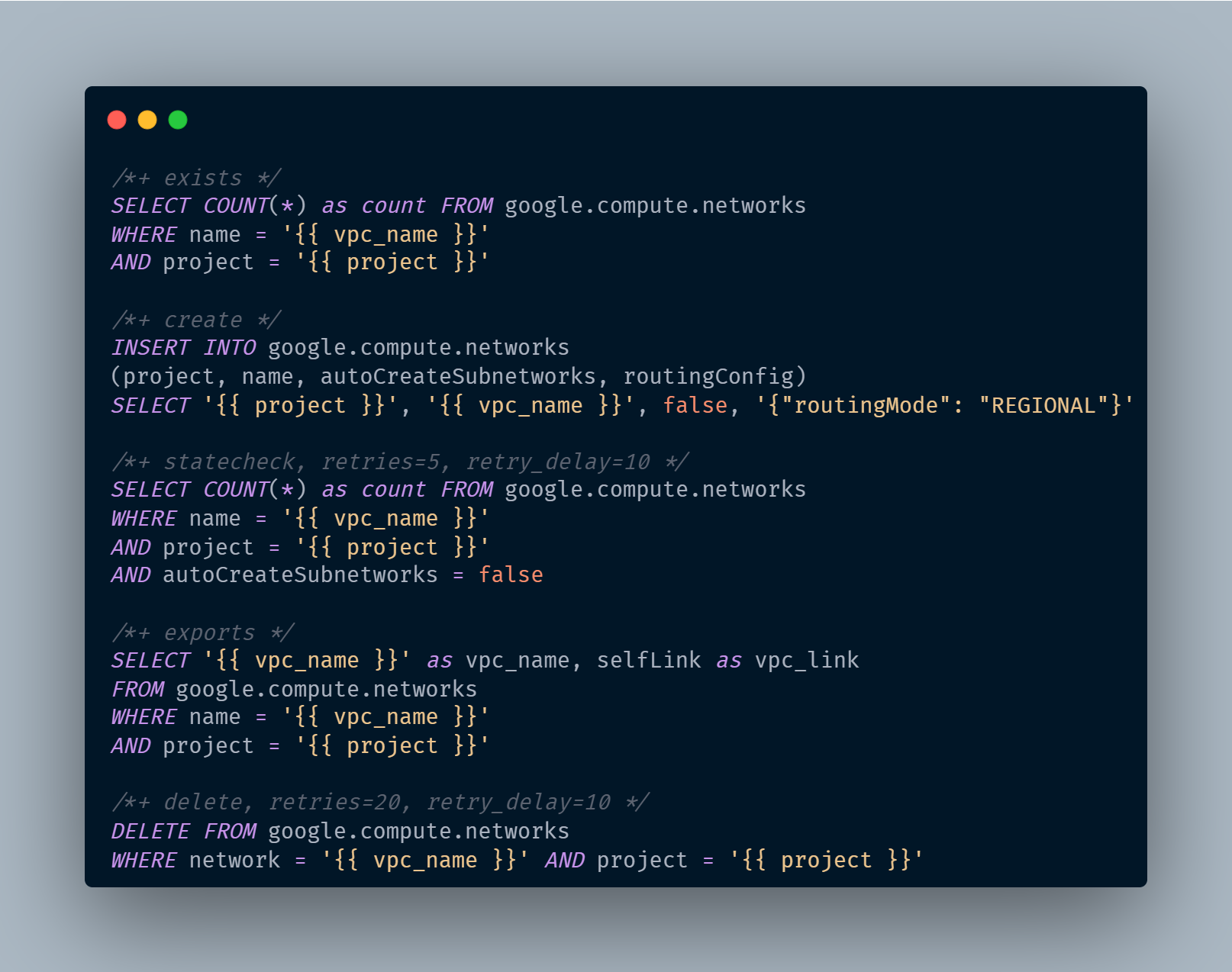
Read the anchors in order. exists is a live query that answers whether the resource is already there. create is the mutation to run if it isn't. statecheck runs after create to confirm the resource actually reached the desired configuration, with retries and delays for slow-to-propagate cloud APIs. exports captures values to reuse in other resources within the same stack. delete is the reverse mutation for teardown.
A note on the INSERT syntax. The columns split between path parameters (project stays plain since it maps to the URL path) and body fields (data__name, data__autoCreateSubnetworks, data__routingConfig get the data__ prefix). This is method-specific rather than universal across providers, and you can confirm the exact contract for any resource with:
DESCRIBE METHOD google.compute.networks.insert;
This is the same query-before-mutation loop Tutorial 2 walked through by hand, formalized into a resource-file structure. The framework runs it for every resource in the manifest, in dependency order, with proper handling for the states each resource can be in.
Running a dry-run build
Install stackql-deploy via cargo:
cargo install stackql-deploy
Then, from the parent directory of your stack, run build in dry-run mode with a stack name, an environment name, and your project ID:
stackql-deploy build example-stack dev --dry-run -e MY_PROJECT_NAME=your-project-id
The framework loads the manifest, resolves the globals with your environment variables, then walks each resource in order. In dry-run mode, it renders every query it would execute against the cloud API and reports what it would do, without actually mutating anything. All the template variables are resolved: {{ project }} becomes your project ID, {{ vpc_name }} becomes example-stack-dev-vpc, and the routingConfig JSON is inlined into the INSERT.
Dry-run is the first thing to reach for. It gives you the full execution plan without touching your cloud, which makes it the natural pattern for pull-request checks and pre-deploy previews.
Running for real
Once the dry-run output looks right, drop the flag to execute:
stackql-deploy build example-stack dev -e MY_PROJECT_NAME=your-project-id
The framework runs the same sequence, but this time the exists check hits the cloud API, and if the resource is missing, the create INSERT is sent for real. statecheck retries until GCP reports the resource has converged to the desired configuration, then exports capture the live values:
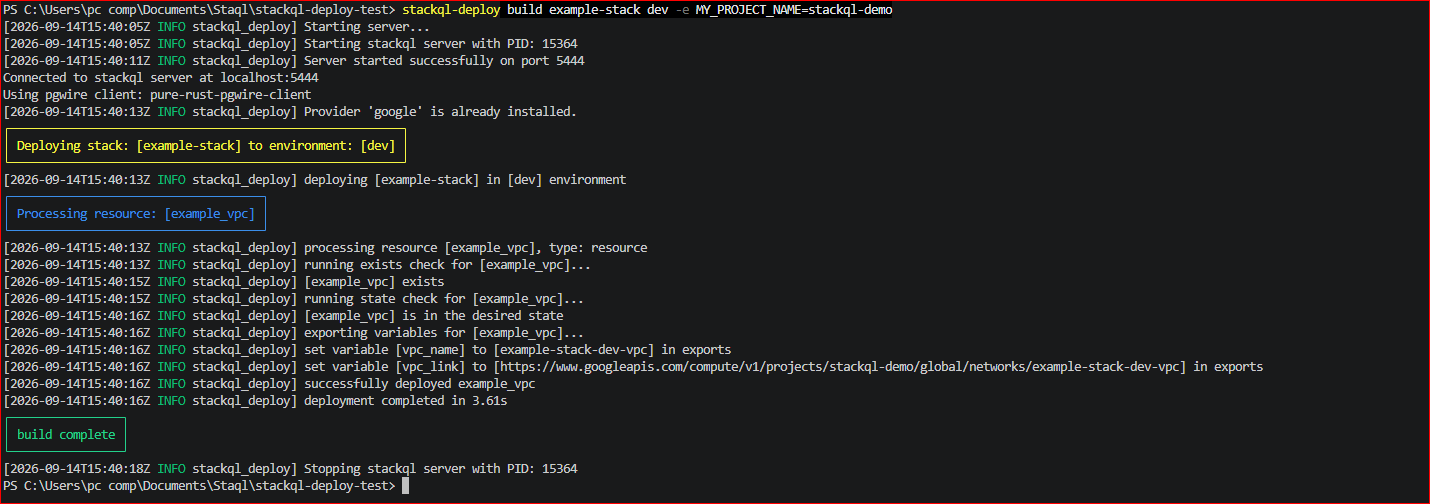
Read that output top to bottom. exists returned no match, so create ran. Right after create, the framework re-ran the exists check and confirmed the VPC was there. statecheck ran once and passed. exports captured vpc_name and vpc_link. Total time: under 4 seconds for a single-resource stack. The same pattern scales to a stack with dozens of resources across multiple providers.
For test-only runs (checks without mutations, useful in CI):
stackql-deploy test example-stack dev -e MY_PROJECT_NAME=your-project-id
And to reverse the whole stack:
stackql-deploy teardown example-stack dev -e MY_PROJECT_NAME=your-project-id
What this enables
The obvious use is provisioning: describe a stack once, deploy it across dev, sit, and prod environments by changing one flag. But the deeper value is what the anchor structure enables.
Because every resource has an exists check and a state check, running build against an already-deployed stack is a policy convergence run. If someone changed a firewall rule out of band, the next build detects the drift via statecheck and re-applies the correct configuration. Nothing else on the stack gets touched. That's continuous convergence without needing a separate drift-detection tool.
Because everything is SQL and the query grammar is the same across every provider, extending a stack from GCP-only to multi-cloud is a matter of adding new .iql files and provider entries in the manifest. No new tool to learn, no separate DSL, no provider-specific templating conventions.
And because the framework is CI-friendly (test for validation without mutation, dry-run for previews, exit codes for pass/fail), it slots into whatever pipeline you already use to ship infrastructure changes.
Where this fits in the series
Tutorial 1 introduced stackql for querying live cloud state across multiple clouds with SQL. Tutorial 2 showed how the same query engine lets agents read live state before mutating anything, one query at a time. The Actions guide put the audit pattern in CI. This tutorial shows the framework that operationalizes the whole pattern: not one query at a time, but a manifest-driven declaration of an entire cloud stack, with idempotence, environment scoping, and continuous convergence built in.
If the pattern makes sense to you, star the stackql repository so more developers find it. Full documentation, more manifest examples, and provider-specific guides are at stackql-deploy.io.
Next in this series: authoring your own multi-cloud stack from scratch, using stackql-deploy against AWS and GCP together.