Add continuous cloud audit to your CI/CD in ten minutes
Cloud security reviews are usually quarterly. Configuration drift happens daily. Between review cycles, buckets get created, firewall rules get loosened, service accounts get reused, and a bucket that was locked down last quarter might not be locked down today. Nothing about the review cadence catches any of it.
Tutorial 1 in this series walked through auditing three clouds with stackql from your terminal. Tutorial 2 showed how the same query engine lets an agent read live state before mutating anything. This guide takes the same audit pattern and puts it in your CI, so the check runs every day, or on every pull request, or every hour, without anyone remembering to run it.
The tool is stackql-audit-action, a GitHub Action that runs an opinionated set of security checks against your cloud accounts and renders findings inline on the workflow run page. Setup is copy-paste. First results in under two minutes.
What it checks
The action ships with seven built-in checks for GCP:
- SSH (22/tcp) open to the internet — HIGH
- RDP (3389/tcp) open to the internet — HIGH
- Cloud SQL instances reachable on a public IP — HIGH
- Compute instances with public IPs — MEDIUM
- Compute instances using the default service account — MEDIUM
- Storage buckets without uniform bucket-level access — MEDIUM
- Default VPC network exists — MEDIUM
Similar built-in check sets exist for AWS and Azure. A provider only runs if its credentials are supplied, so you can start with GCP and add the others by dropping in their secrets. This walkthrough covers GCP end to end.
Setup
You need three things:
- A GitHub repository
- A GCP project you're authorized to audit
- A Google Cloud service account JSON key with read access to Compute, Cloud SQL, Storage, and IAM
Store the service account key as a GitHub secret. In your repository, go to Settings → Secrets and variables → Actions → New repository secret. Name the secret GCP_SA_JSON and paste the full JSON key as the value.
Never commit credentials to the repo. Never share a key JSON on Slack or email. Rotate the key if you ever paste one somewhere by accident.
Add the workflow
Create .github/workflows/cloud-audit.yml with this content:
name: GCP Audit

on:
  workflow_dispatch:
    inputs:
      project-id:
        description: GCP project ID to audit
        required: true
      fail-on-severity:
        description: Severity threshold to fail on (CRITICAL/HIGH/MEDIUM/LOW/NONE)
        required: false
        default: HIGH

jobs:
  audit:
    runs-on: ubuntu-latest
    steps:
      - uses: stackql/stackql-audit-action@v0.1
        with:
          project-id: ${{ inputs.project-id }}
          gcp-credentials: ${{ secrets.GCP_SA_JSON }}
          fail-on-severity: ${{ inputs.fail-on-severity }}
Two things worth noting. The action is pinned to @v0.1 for reproducibility. If you use @main, tomorrow's audit runs against tomorrow's version, which can change without warning. Pin to a real tag or a commit SHA. The fail-on-severity input controls when the workflow fails. For a first run, set it to NONE so the workflow completes even if findings surface. Once you've reviewed the output and confirmed the checks match your expectations, raise it to HIGH or MEDIUM as an enforcement gate.
Run the audit
Commit and push. Then in your repository, go to Actions → GCP Audit → Run workflow. Fill in the project ID and start the run. First run takes about 20-30 seconds.
When the run completes, click into it and scroll down. The audit summary renders inline as a markdown table on the workflow run page:
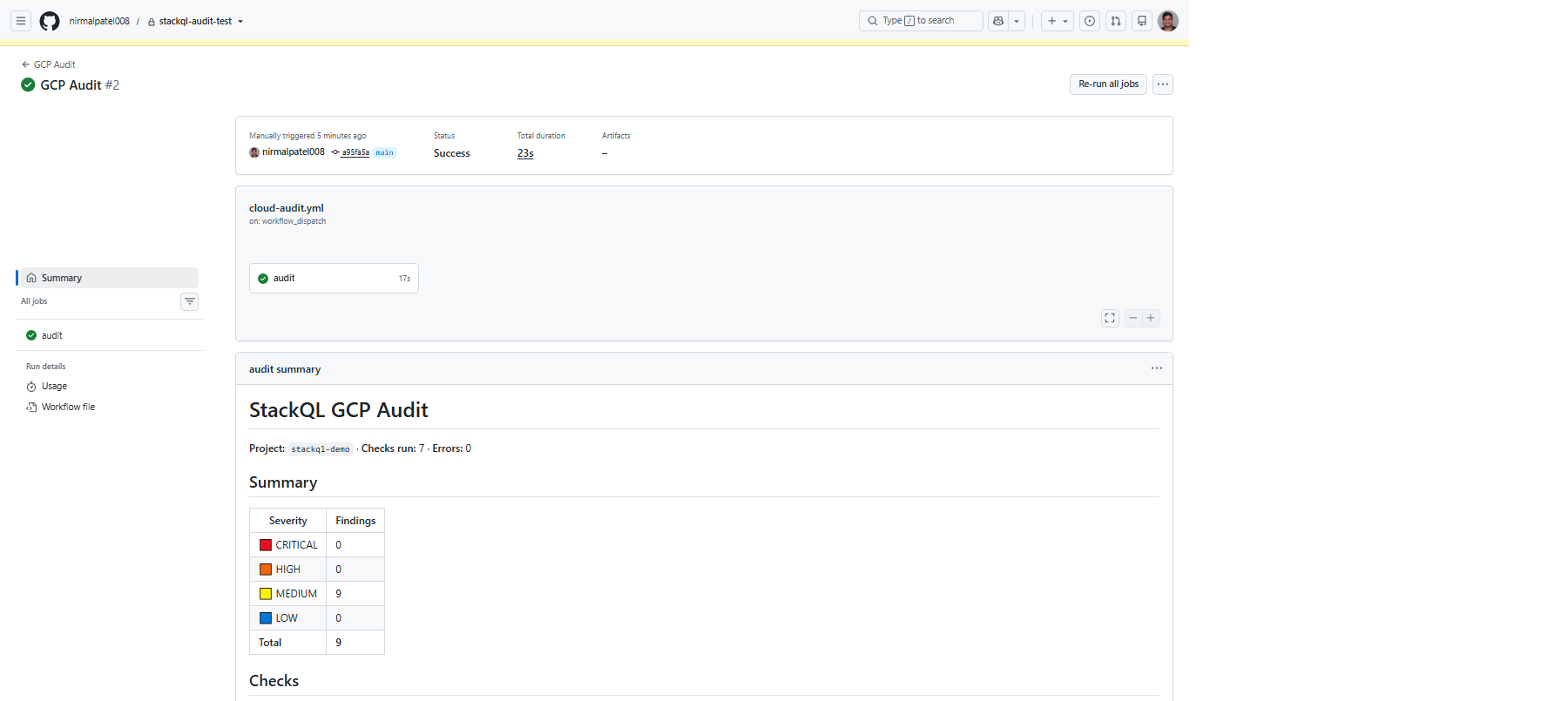
Every check reports its status. Green checkmarks mean the check ran and found nothing. Yellow (MEDIUM) or red (HIGH) markers mean findings surfaced, with the affected resource names listed in a table and a short remediation note underneath.
In this test run, the audit surfaced nine medium-severity findings across three categories: one Compute instance using the default service account, one Compute instance with a public IP, and seven buckets without uniform bucket-level access. The other four checks ran and returned no findings. That distinction matters. A check running cleanly is signal too.
Making it continuous
Manual triggers are for testing. For continuous audit, change the trigger to run on a schedule or on pull requests:
on:
  schedule:
    - cron: '0 9 * * *'   # every day at 09:00 UTC
  pull_request:
    branches: [main]
  workflow_dispatch:      # keep manual trigger as a fallback
    inputs:
      project-id:
        description: GCP project ID to audit
        required: true
The scheduled run catches drift that happens outside your PR flow. The pull-request run catches policy violations before they merge. Together they cover both the intentional and the accidental changes that can widen your attack surface between security reviews.
Extending it with your own checks
The seven built-in checks are a starting point, not the full set your organization cares about. The action lets you point at your own directory of check definitions, one YAML file per check:
id: my-org-firewall-check
name: Allow only known source ranges
severity: HIGH
description: Catch firewall rules with sourceRanges outside our corp CIDRs.
remediation: Restrict to known CIDRs or migrate to IAP.
query: |
  SELECT name, network, sourceRanges
  FROM google.compute.firewalls
  WHERE project = '${PROJECT_ID}'
    AND direction = 'INGRESS'
columns: [name, network, sourceRanges]
A query returning zero rows means no findings. Any rows returned become finding rows. Every check is a small YAML file, so extending the audit to cover your organization's specific policies is one file per rule. See the queries/ directory in the action repository for the built-in checks as reference implementations.
Where this fits
Tutorial 1 in this series introduced the audit pattern manually: SELECT across three clouds, spot the risky resources, know what to fix. Tutorial 2 introduced query-before-mutation: read live state before an agent acts, apply a policy gate, converge safely. This guide connects the two. The audit runs continuously in CI. When something drifts, the query-before-mutation pattern is how an agent or an operator brings it back into policy.
If the pattern makes sense to you, star the stackql-audit-action repository so more developers can find it. And if you have suggestions for checks that belong in the built-in set, the queries/ directory takes pull requests.
Next in this series: authoring your own check library with stackql-audit-action, and running the same pattern against AWS and Azure alongside GCP.