
3 posts tagged with "stackql provider registry"

View All Tags

Identify Outdated TLS Versions in Azure with StackQL

· 2 min read
Technologist and Cloud Consultant

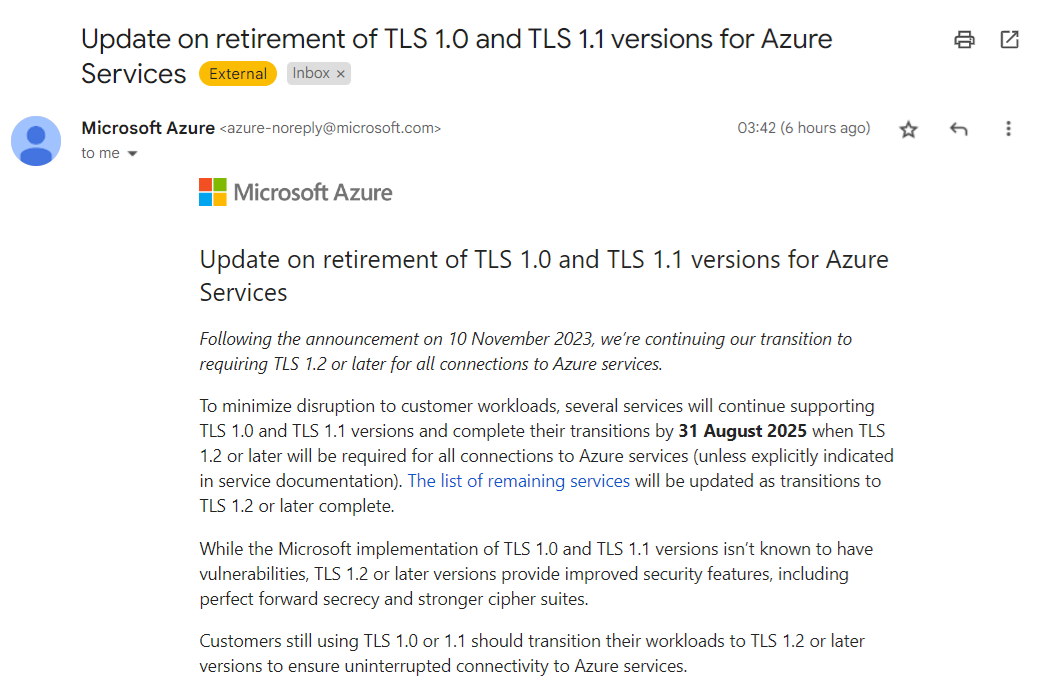
Have you received one of these?

Azure TLS Deprecation Email

Microsoft Azure is retiring TLS 1.0 and 1.1 for its services, requiring customers to transition to TLS 1.2 or later to ensure uninterrupted connectivity. If you have workloads still using older TLS versions, you’ll need to update them.

Using StackQL to Identify Non-Compliant Resources​

With StackQL, you can quickly identify resources in your Azure environment that are still using older TLS versions. This article shows how to leverage StackQL queries to check various Azure services for compliance.

Prerequisites​

  1. Pull the latest StackQL provider for Azure using REGISTRY PULL azure.
  2. Authenticate with Azure using StackQL by setting up your credentials as environment variables (or using your existing az login system/session authentication).

Queries to Run​

Below are example queries you can use to identify resources affected by the TLS 1.2 requirement (use your subscriptionId of course):

1. Check Application Gateway Configurations​

Azure Application Gateways may support older TLS versions. Run the following query to get their configurations:

SELECT
id,
name,
JSON_EXTRACT(properties, '$.sslPolicy') as ssl_policy,
JSON_EXTRACT(properties, '$.defaultPredefinedSslPolicy') as default_predefined_ssl_policy
FROM
azure.network.application_gateways
WHERE
subscription_id = '123e4567-e89b-12d3-a456-426614174000'
AND ssl_policy IS NOT NULL
AND JSON_EXTRACT(properties, '$.sslPolicy') NOT LIKE '%TLS12%';

This query lists all Application Gateways configured with TLS versions lower than 1.2.

2. Inspect App Service Configurations​

If you use Azure App Services (Web Apps), check their TLS configurations with this query:

SELECT
id,
name,
JSON_EXTRACT(properties, '$.httpsOnly') as https_only,
JSON_EXTRACT(properties, '$.siteConfig.minTlsVersion') as min_tls_version
FROM
azure.web.web_apps
WHERE
subscription_id = '123e4567-e89b-12d3-a456-426614174000'
AND JSON_EXTRACT(properties, '$.siteConfig.minTlsVersion') < '1.2';

This returns all web apps that allow connections using TLS versions older than 1.2.

3. Check SQL Server Instances​

Azure SQL Databases and SQL Managed Instances may also have TLS configurations that need checking:

SELECT
location,
fullyQualifiedDomainName,
minimalTlsVersion,
state
FROM
azure.sql.servers
WHERE
subscription_id = '123e4567-e89b-12d3-a456-426614174000'
AND minimalTlsVersion < '1.2';

This shows all SQL servers with a minimal TLS version set below 1.2.

We’d love to hear your feedback. ⭐ us on GitHub and let us know how StackQL helps you manage your Azure resources!

Using StackQL in Native Cloud Shells in AWS, Azure and GCP

· 4 min read
Technologist and Cloud Consultant

StackQL allows you to query and interact with your cloud and SaaS assets using a simple SQL framework. Use cases include CSPM, asset inventory and analysis, finops and more, as well as our IaC and ops (lifecycle management).

The three major cloud providers all offer a built-in Linux shell for executing commands using their respective CLIs; in some cases, they come with tools like terraform pre-installed. They are pre-authorized with your credentials in the cloud console for the user you authenticated with.

Now you can easily use stackql - a unified analytics and IaC dev tool - in all major cloud providers' built-in shells, using cloud shell scripts packaged with the stackql Linux binary (available from v0.5.587 onwards).
StackQL is particularly useful for asynchronously querying across regions in AWS, projects in Google, or resource groups in Azure, which is challenging to do via the CLIs. For example:

SELECT region, COUNT(*) as num_functions
FROM aws.lambda.functions
WHERE region IN (
'us-east-1','us-east-2','us-west-1','us-west-2',
'ap-south-1','ap-northeast-3','ap-northeast-2',
'ap-southeast-1','ap-southeast-2','ap-northeast-1',
'ca-central-1','eu-central-1','eu-west-1',
'eu-west-2','eu-west-3','eu-north-1','sa-east-1')
GROUP BY region;

Additionally, you could authenticate to another provider from one cloud shell simultaneously and run multi-cloud inventory commands. For example:

SELECT
name,
SPLIT_PART(machineType, '/', -1) as instance_type,
'google' as provider
FROM google.compute.instances
WHERE project IN ('myproject1','myproject2')
UNION
SELECT
instanceId as name,
instanceType as instance_type,
'aws' as provider
FROM aws.ec2.instances
WHERE region IN (
'us-east-1','us-east-2','us-west-1','us-west-2',
'ap-south-1','ap-northeast-3','ap-northeast-2',
'ap-southeast-1','ap-southeast-2','ap-northeast-1',
'ca-central-1','eu-central-1','eu-west-1',
'eu-west-2','eu-west-3','eu-north-1','sa-east-1');

Getting Started​

To get started with StackQL in your preferred cloud shell environment, download the StackQL package using the following command:

curl -L https://bit.ly/stackql-zip -O \
&& unzip stackql-zip

This command downloads the StackQL package, unzips it, and sets the appropriate permissions. From there, you can use our tailored scripts for AWS, Google Cloud, or Azure to integrate StackQL seamlessly into your cloud shell environment.

Using StackQL in the AWS Cloud Shell​

Run the stackql-aws-cloud-shell.sh as follows to use the StackQL command shell within the AWS cloud shell:

sh stackql-aws-cloud-shell.sh

An example is shown here:

aws-cloud-shell-example

You can also run stackql exec commands using the stackql-aws-cloud-shell.sh script; for instance, this command will write a CSV file for the results of a query that could be downloaded from the Cloud Shell.

sh stackql-aws-cloud-shell.sh exec \
--output csv --outfile instances.csv \
"SELECT region, instanceType FROM aws.ec2.instances WHERE region IN ('us-east-1')"

Additionally, you can supply an IAM role using the --role-arn argument to assume another role for your query or mutation operation, an example is shown here:

sh stackql-aws-cloud-shell.sh \
--role-arn arn:aws:iam::824532806693:role/SecurityReviewerRole exec \
--infile query.iql \
--output csv --outfile output.csv

Using StackQL in the Azure Cloud Shell​

Run the stackql-azure-cloud-shell.sh as follows to open a StackQL command shell from the Azure Cloud Shell:

sh stackql-azure-cloud-shell.sh

An example is shown here:

azure-cloud-shell-example

Similar to the AWS script, you can also invoke stackql exec as well, an example is shown here:

sh stackql-azure-cloud-shell.sh exec \
--output csv --outfile instances_by_location.csv \
"SELECT location, COUNT(*) as num_instances FROM azure.compute.virtual_machines WHERE resource_group_name = 'stackql-ops-cicd-dev-01' AND subscription_id = '631d1c6d-2a65-43e7-93c2-688bfe4e1468' GROUP BY location"

Using StackQL in the Google Cloud Shell​

Run the stackql-google-cloud-shell.sh as shown below to launch a StackQL command shell from within the google cloud shell:

sh stackql-google-cloud-shell.sh

An example is shown here:

google-cloud-shell-example

As with the other two providers, you can run exec commands following the example below:

sh stackql-google-cloud-shell.sh exec \
--output csv --outfile instances.csv \
"SELECT name, status FROM google.compute.instances WHERE project = 'stackql-demo'"

Please give us your feedback! Star us at github.com/stackql.

Analyzing IAM in the GCP Resource Hierarchy

· 3 min read
Technologist and Cloud Consultant

StackQL allows you to query and interact with your cloud and SaaS assets using a simple SQL framework

Understanding entitlements across a GCP org with a complex hierarchy is a challenge. I have taken and data-centric approach to this in this article.

Prerequisites include setting up a Jupyter environment with StackQL (done here using Docker): stackql-jupyter-demo. You will also need a service account and associated key with the roles/iam.securityReviewer role.

I've broken the notebook bits down to explain...

Setup​

This step includes importing the required libraries (pandas etc.) and instantiating a StackQL client with the service account creds you created before. You will supply your root node here using the org_id and org_name variables.

Next we will create some helper functions; these will help us enumerate nodes in the GCP org resource hierarchy and fetch and unnest IAM policies.

Get all nodes in the resource hierarchy​

Create a dataframe containing all nodes in the resource hierarchy, including the root node (the organization), each folder with its subfolders, and projects. The functions used will search each folder in the hierarchy to find its subfolders and projects using a depth-first search approach.

Inspecting the output, it looks like this:

GCP Nodes

Create a dataset including each node and its associated IAM policies​

This step will fetch all of the policies applied at each node in the data structure we created in the previous step.

The IAM policies response from SELECT role, members FROM google.cloudresourcemanager.project_iam_policies ... presents some challenges as members is a nested list which we need to unnest (or explode) along with the associated role and conditions (if they exist).

This bit of massaging will give us a SQL-friendly model we can use for analysis and join with another data source (such as a list of identities from an identity provider).

Inspecting the Final Output

We can now peek at the final data set, which looks like this:

GCP Nodes with IAM Policies

What's next? You could now join this with data from your IdP, or other SaaS services to correlate entitlements across your entire estate. You could also drill into specific service accounts, users, or groups. Queries are run in real-time, so you can refresh the data by simply rerunning the cells.

Welcome your feedback by getting in touch or raising issues at stackql/stackql or stackql/stackql-provider-registry, give us some ⭐️ love while you are there!

Enjoy!